You pay for Microsoft 365 for the whole shop and wonder whether everyone needs the plan you bought.
Microsoft 365 business plans come in three main sizes: Business Basic, Business Standard and Business Premium. All three are sold for 1 to 300 users, and all three include business email on your own domain, OneDrive storage and multi-factor sign-in (Microsoft Canada's plan comparison, checked 16 November 2026).
The usual mistake isn't picking the wrong plan. It's picking one plan for everyone. You can mix them in the same account, and in a 10-person trades shop the people do very different work.
The short version
- Business Basic, Standard and Premium can be mixed in the same account, so decide per person.
- Crew on phones need Basic, desk staff who live in Excel or Outlook need Standard, and the owner and office get Premium first.
- Start with unused licences, then the owner's account, which has the most access.
What each plan adds
Business Basic gives you email, calendar, Teams (in the version with Teams), 1 TB of OneDrive storage per user, and Word, Excel, PowerPoint and OneNote in the browser and on phones. No desktop apps: Microsoft lists it as "web and mobile apps only."
Business Standard adds the desktop versions of Word, Excel, PowerPoint and Outlook, installable on up to five PCs or Macs, five tablets and five phones per person. Mailbox and OneDrive sizes are the same as Basic: a 100 GB mailbox and 1 TB of storage per person.
Business Premium adds the security and device tools. On Microsoft's comparison, these are Premium-only: advanced Microsoft Entra ID (the rules for who can sign in from where), Intune Plan 1 to manage company PCs and phones, Microsoft Defender for Business to protect devices from ransomware and malware, Defender for Office 365 Plan 1 for email links and attachments, data loss protection for email and files, the Windows 11 Pro upgrade, and a 1.5 TB email archive instead of 50 GB. Basic and Standard get the free version of Entra ID.
Microsoft now also sells Standard and Premium "with Copilot," and sells plans with and without Teams in Canada. Copilot is a separate decision from the one in this post: pick the plan for the work first.
Who in the shop needs which
- Crew who work from a phone: Basic. Email, calendar, Teams, and a look at a quote or a schedule in the browser is all most need.
- Whoever lives in Excel or Outlook all day: Standard, for the desktop apps. Estimators, the bookkeeper and the dispatcher usually land here.
- The owner and the office: Premium. These are the accounts with the bank, the payroll and the customer list behind them, so they get the device management and protection first.
If every PC in the office holds customer or financial data, Premium for everyone at a desk is the simpler rule. The point is to decide per person, not to buy the top plan for a crew phone that only reads email.
What I ran
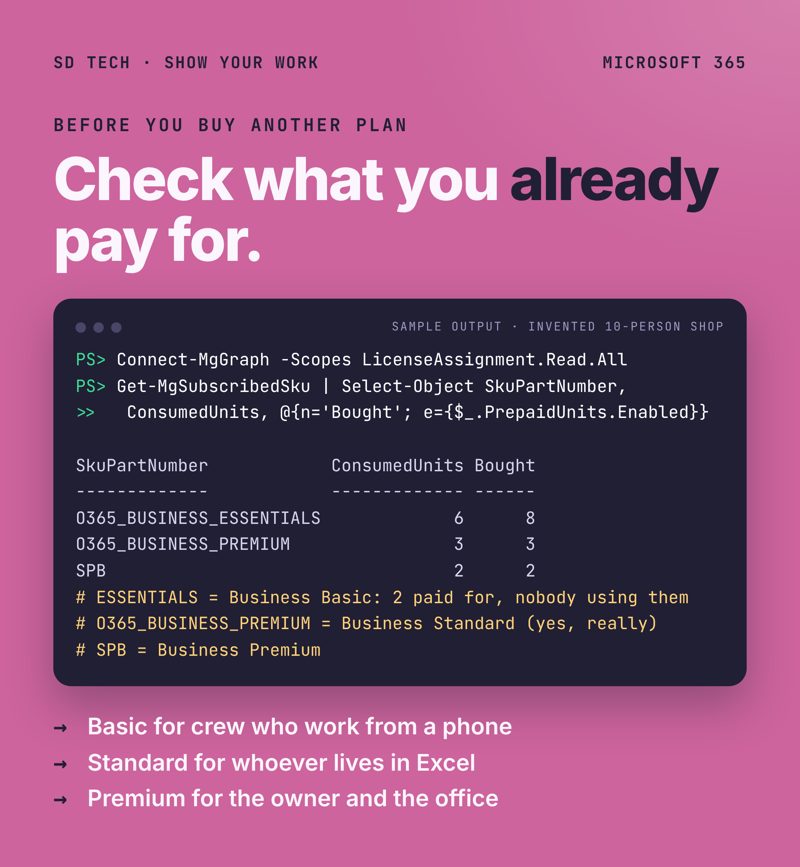
Before buying anything, I check what the business already pays for. In PowerShell, with the Microsoft Graph module:
Connect-MgGraph -Scopes LicenseAssignment.Read.All
Get-MgSubscribedSku | Select-Object SkuPartNumber, ConsumedUnits,
  @{n='Bought'; e={$_.PrepaidUnits.Enabled}}
Sample output, invented 10-person shop:
SkuPartNumber              ConsumedUnits Bought
-------------              ------------- ------
O365_BUSINESS_ESSENTIALS               6      8
O365_BUSINESS_PREMIUM                  3      3
SPB                                    2      2
What to look for: any row where "Bought" is higher than "ConsumedUnits" is licences paid for and unused. Here, two Basic licences have nobody on them. The names are confusing, so check them against Microsoft's licensing name list: O365_BUSINESS_ESSENTIALS is Business Basic, O365_BUSINESS_PREMIUM is Business Standard (yes, really), and SPB is Business Premium. The command needs only read permission (subscribedSku); it changes nothing.
A checklist you can use today
- ☐ Run the licence check and note any unused licences.
- ☐ List everyone in the shop and what they do all day: phone, browser or desktop.
- ☐ Mark the accounts with access to money or customer data.
- ☐ Remove licences from people who have left, and decide whether to keep their mailbox.
- ☐ Before the renewal date, match each person to Basic, Standard or Premium.
- ☐ If anyone moves to Premium, plan the device setup with them; the tools only help once they're turned on.
What I'd check first
The unused licences. They're the quickest saving, and the check takes two minutes. Then the owner's account: if it's on Basic or Standard, it's missing the device and sign-in protection that matters most for the account with the most access. Moving one or two accounts to Premium usually beats moving the whole shop.
Licences are one of the things I look at in a free IT check-up: I look, change nothing, and you keep the plan. If you're in the Fraser Valley, book one at sd-techsolutions.com.
This started as a LinkedIn post. Join the conversation there.